Solo video game project

Kindle

A first-person puzzle game about restoring color to a world that chose to forget it.

One bright spring, storms and all,
beats a thousand quiet years.

I made Kindle alone over six months. Its world gave up feeling so that nothing in it could hurt or wither. I think that is a bad trade. The game is how I argue it: you bring the place back one corner at a time, and nobody says a word.

Role / Responsibilities

Game & systems designGameplay programmingLevel & narrative designTechnical art & shadersUI/UX designVFX & rendering pipeline

Focus

Telling a story with no text

Duration

6 months, solo

Tools

Unity 6 URP · C# · HLSL

Initialising WebGPU
FPS --
Parameters

Trailer

2:11

gallery

线性雾

01 / Reference & Difference

I borrowed the bloom
from Ōkami.

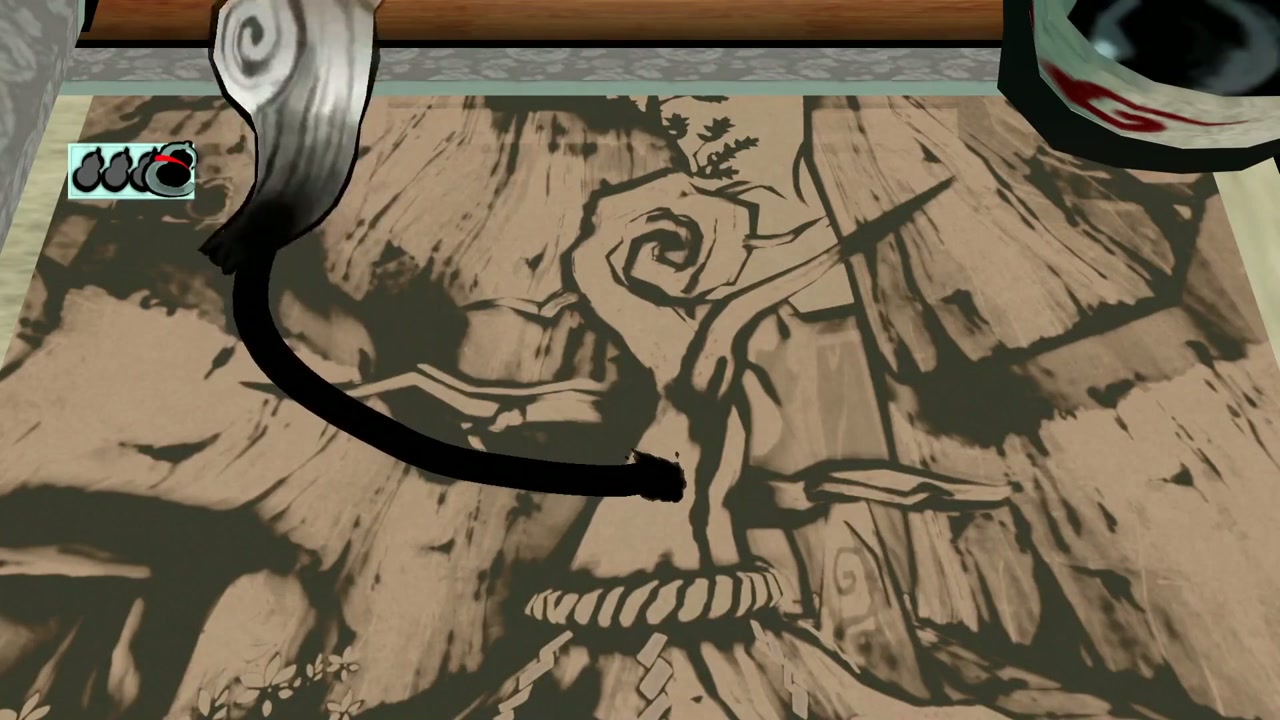
In high school I replayed Ōkami to write a few pages about it for a club zine, trying to work out why it got to me. It came down to one brushstroke: draw across a dead tree and it flowers, and you are the one who drew it. Kindle starts there.

In Ōkami

Heal an area and it stays in bloom. The world comes back piece by piece, and you keep every piece.

In Kindle

Color comes back only where you are working, and fades when you leave. I held the rest until the end, so the whole world returns at once.

Revitalizing Sakuya's Guardian Sapling to dispel the evil curse.

03 / Level Design & Technical Breakdown

The levelsteach it.

  • LaunchGuess the bounce
  • RestorePick the order
  • MaterializeBuild the route

Each mechanic gets its own run of levels.

Every run goes in the same order: a level that teaches the idea, levels that make it harder, and one that leaves you alone with it. They still play nothing alike.

01TeachOne idea at a time
02DevelopAdd constraints
03SynthesizeOn your own

03.1 / Launch

Where will
it land?

What I wanted to knowCan I show players where a shot will go without doing the thinking for them?

Launch gameplay

03.1.1 / Puzzle Premise

Read the room as a chain of impacts.

This level is built as a physical puzzle. Players adjust the launch angle, then anticipate how the projectile will rebound through the chamber and strike the mechanism that opens a sealed gate.

Player skill
Physical intuition
Primary variables
Angle · Collision · Timing
Success state
Gate mechanism activated
Particle feedback

03.1.2 / Mechanic–Fiction Alignment

Fusion lets pale objects move again.

Fusion lets pale, inert objects receive force again, so the puzzle state reads through the same rule that defines the fiction.

Directional particles preview angle and impact strength before release, with no separate interface.

In abstract space, precise visual form makes invisible physical change readable.

INERT+FUSION→FORCE-RESPONSIVE
Trajectory preview

03.1.3 / Technical System

The preview runs on the real rules.

The guide steps a duplicate projectile through an isolated physics space, so the preview stays accurate across rebounds instead of drawing an approximate parabola.

Resets happen off-screen, so the launch reads as one continuous event.

  1. 01Clone input state
  2. 02Step isolated simulation
  3. 03Sample collision path
  4. 04Render guide particles
Reading the bounce

The preview acts as a prediction layer: it shows the likely consequence before the player commits to a launch.

Seeing the force

An invisible force estimate becomes readable feedback.

Clone → Step → Sample → Render

Each previewed rebound follows the live collision rules.

03.2 / Restore

Now getback out.

What I wanted to knowWhat if you can see the goal from the door, and the hard part is getting back out?

Goal and exit

03.2.1 / Premise

Show the goal. Hide the exit.

Restore shows its objective on entry. Reaching the white lotus is the easy part; the real puzzle is finding the way out.

This inversion shifts the level from pursuit to consequence.

The cave spring

03.2.2 / Environmental Aesthetic

The world as it once was.

A single shaft of light falls into a cavern spring, lighting a white lotus while blue wildflowers break through the rock.

This quiet beauty is an early reward and a glimpse of the setting: it is how the world looked before it froze and was stripped of change.

A shaft of lightStill waterBlue wildflowers
The escape

03.2.3 / Mechanic & Ascent

Restore gravity. Climb out.

Restore returns gravity to suspended objects one at a time. Each piece that settles becomes the next foothold, until the route reaches the opening above.

The goal comes first

One leap reaches the lotus. Only then do players look up at the exit, far out of reach.

The cave spring

A preview of the revival still to come.

Climbing out

The exit that looked out of reach is rebuilt one step at a time.

03.3 / Materialize

Build yourown stairs.

What I wanted to knowCan a level show you its ending first, send you up a climb, and pay it off back where you started?

The cage and the stair

03.3.1 / Spatial Premise

A cage below.
A stair into the fog.

The level opens on an iron cage and a stair that vanishes into fog. Debris falling from above hints at the payoff: a boulder at the summit, pushed down to smash the cage.

The revealing sphere turns hidden geometry into footholds for the climb.

Choosing the range

03.3.2 / Mechanic & Expectation

Every reveal is a decision about range.

Placement defines scope: reveal too little and the route remains incomplete; commit at the wrong height and the next connection becomes unreachable.

Implementation

Runtime CSG turns each placement into walkable ground. A depth backup keeps translucent objects from blocking the fog.

The rooftop tree

03.3.3 / Environmental Aesthetic

Light through the canopy.

A lone tree grows from a concrete rooftop. Sunlight breaks through its leaves and hangs in the air as visible shafts.

Hard concrete against soft, moving light gives the climb a quiet place to land.

Footholds from nothing

The sphere turns an unseen route into a sequence of deliberate footholds.

Choosing the range

Each placement decides what becomes reachable next.

The rooftop tree

The light is the reward for reaching the top.

03.4 / Shared System

How the sphere is wired.

Unity 6 · URP · C#

03.4.1 / Class Structure

Each level plugs into the reveal.

TerrainPlacementSystem places the sphere and raises OnPlaced and OnRetractStart. SphereRevealController subscribes to those events and drives a reveal progress value from 0 to 1, which shaders, VFX and physics all read. Each level mechanic is its own MonoBehaviour that holds references to these components and reads their state, so adding a level meant writing a new component while the controller stayed untouched.

Coupling
Serialized references, C# events
Conflicts
ReserveControl per Rigidbody
Timing
Physics unlocks at progress ≥ 0.999
UML class diagram: eight sphere classes extend MonoBehaviour; level components reference the placement, reveal and intersection classes.«UnityEngine»MonoBehaviour«subscribe»OnPlacedclassifypolls IsPlacedprogress ≥ 0.99unlocks ≥ 0.999allDetectedObjectsreservesRigidbodyPredict()ExecuteCSG()Input · Fusion ZoneTerrainPlacementSystem+ IsPlaced : bool+ event OnPlaced+ event OnRetractStartShared rule · Fusion ZoneSphereRevealController+ currentProgress : float+ isAnimating : bool+ StartRevealAnimation()Shared query · Fusion ZoneSphereIntersectionDetector+ allDetectedObjects+ DetectAndClassifyObjects()+ GetClosestGroundObject()03.3 / MaterializeCSGTriggerOnPlacement- OnPlacementStateChanged(bool)- OnRetractStarted()- OnCSGCompleted(GameObject)03.1 / LaunchProjectileFire+ projectileRigidbody : Rigidbody+ StartFireSequence()+ Fire()03.2 / RestoreRevealPhysicsReactor+ ReserveControl(Rigidbody)+ UnlockPhysics(Rigidbody)+ ResetPhysics(Rigidbody)Helper · LibCSGCSGExample+ ExecuteCSG()+ event OnCSGCompletedHelper · Separate PhysicsSceneTrajectoryPredictionManager+ Predict(start, force, sourceRb)+ HideTrajectory()Notationextendsholds a reference tosubscribes to an event
Fig. 03.4

UML class diagram, simplified to the members each level relies on. No class in the sphere system uses an interface; behaviour is composed from components on the sphere and its targets.

04 / Developing the Experience

FromFirst draftToFinal build.

Each version fixed something the last one got wrong.

This chapter covers the Kuwahara reveal, SDF particle formation and trajectory prediction; contextual pickup guidance; and the development log behind them.

01IterateOne version at a time
02GuideStay out of the way
03DocumentWrite it down

04.1 / Iteration

Three things I reworked.

For each: the first version, what was wrong with it, and what replaced it.

04.1.1 / Kuwahara Filter & Regional Reveal

FromStencilToCamera masks.

My first working version used the Stencil Buffer to decide which pixels get the Kuwahara filter. That gave me a painted look in one part of the frame while the rest stayed as it was.

At first the edge of the reveal was a fixed plane in world space. Its shape on screen kept changing as the camera and the object moved, so I replaced it with a mask built from where the object sits on screen.

Stage A
Stencil-gated Kuwahara rendering.
Stage B
Object-driven screen-space reveal mask.
Result
A boundary that remains attached to its subject under camera motion.
Stage A / Stencil BufferConditional Kuwahara RenderingSelective post-process based on stencil state
Stage B / Screen SpaceObject-Aware Reveal MaskReplaces the fixed world-space plane
Stage C / Camera TransitionCamera-Aware Stencil VolumeDual-face depth testing across overlapping marker spheres

Inside a marker sphere, back-face depth switches to Always to hold the reveal.

04.1.2 / Real-Time SDF Particle Formation

FromSampled fieldsToA drifting shape.

I sample a signed distance field of the object in real time and pull the particles toward those points. The object comes back as a volume that keeps shifting, which a mesh-shaped emitter could not give me.

Attraction, damping, cohesion, drift and release all affect each other, so I had to tune them as a set. Where I stopped, you can still read the object while the particles gather, and then its surface loosens and drifts.

KeywordsSDF samplingattractioncohesiondampingdriftdispersion

SamplingReal-Time SDF SamplingSurface samples become particle attraction targets
MotionCohesion & DispersionParticles gather or scatter while the source moves
Final / Integrated SystemParticle-Form Final IterationCalibrated attraction, drift, and release behavior
Comparison captureThe paths split at the first collision.

Free flight matched. The rebound did not. That moved the investigation away from launch force and toward contact resolution.

04.1.3 / Stepped Physics Trajectory Prediction

Tracing the rebound error.

I built the aiming guide with an isolated PhysicsScene and a dummy projectile advanced through stepped Simulate calls. Then I kept the yellow prediction on screen next to a green trace of the real shot, so I could see where they disagreed.

The two paths overlapped in free flight and split at the first rebound. So the error was in the collision, and I could stop suspecting launch force and accumulated gravity.

Working conclusionLook at the contact, not the launch.

Observe → Verify → Isolate → Correct → Codify

Verify and isolate

Fix the measurement,
then rule out variables.

My recorder took its first sample after the first physics step, so the real path started with a small offset before the comparison had even begun. I changed the recorder to capture the projectile position immediately, before its first simulated movement.

I also kept the predicted line visible after leaving aim mode, then checked force, gravity, drag, mass, physics material and timestep across both scenes. Everything matched and the paths still split only at impact, which left the projectile's contact geometry.

Isolated causeThe projectile's collider was giving an unstable contact normal.

Correct and codify

Swap the Mesh Collider
for a Sphere Collider.

The projectile used a Mesh Collider. Its contact point and normal depended on triangle-level intersection tests, so small numerical differences in the stepped prediction scene could produce a different rebound and amplify immediately after impact.

Replacing it with a Sphere Collider made the contact stable. The predicted and real paths now overlap more than 99% by eye, and I now use sphere or capsule colliders for every projectile.

04.2 / UX & Player Guidance

Hints that stay out of the way.

Distance decides when information appears.
Direction decides where it remains.

04.2.1 / Contextual Pickup Guidance

Show only what the player can act on.

Far from an object, the interface shows nothing. As you walk closer, a small marker appears on the object itself. The full prompt comes up only when you are close and looking at it, and a locked object uses the same marker in an unavailable state. If a marked object slides out of frame, its marker sticks to the screen edge, so you still know which way it is without a permanent compass. Anything behind you, or well outside where you are looking, gets no marker at all.

Outside rangeSilent
NearbyWorld anchored
Close + focusedActive
Outside frameEdge clamped
Distance conditionSilent → Aware → Active / Locked

The closer you are and the more directly you look, the more the hint tells you.

Directional continuityOn Screen → Edge Clamped → Hidden

The marker keeps pointing the way from the screen edge, then goes away once the object is well outside your view.

04.3 / Dev Log & Documentation

Documented as I built.

Sep 2025 – Feb 2026 · Notion

04.3.1 / Notion Archive

The working record.

One Notion page, kept in dated entries from September 2025 to the February 2026 deadline and written in Chinese as I worked. It runs from the first lantern prototype through the split into line-art and particle worlds, recording render-pass orders, fixed bugs and the final task board along the way. Longer debugging write-ups sit underneath as subpages.

Design
Two-world rules, puzzles, level docs
Rendering
Stencil Kuwahara, pass order, particle LOD
Debugging
Blit vs. stencil, physics jitter
Tracking
Task board for the Feb 15 deadline

End / Credits

Tools and source assets.

Unity 6 · URP

Rendering
Anisotropic Kuwahara FilterBased on Acerola (Garrett Gunnell)
LineworkAlexander Ameye
URP Planar ReflectionsSiesta Games
URP Volumetric LightCristian Qiu · MIT
Volumetric Fog & Mist 2, Volumetric LightsKronnect
Stylized Water 3Staggart Creations
Reveal & VFX
World AlchemyINab Studio
See Through FXINab Studio
Geometry
LibCSGRuntime CSG library
DiggerTerrain carving
Environment
AllSky FreeSkyboxes
Realistic Terrain Textures LiteTerrain layers
PBR Flower PackVegetation
Tooling
DOTween ProDemigiant
Hot ReloadSingularity Group
Original work
Game & level designThree levels, puzzles, pacing
Gameplay codeSphere placement, reveal, physics, CSG trigger
Shaders & render setupTwo-world stencil, pass order

Third-party assets belong to their authors and are used under their store or open-source licenses.

Back to portfolio